
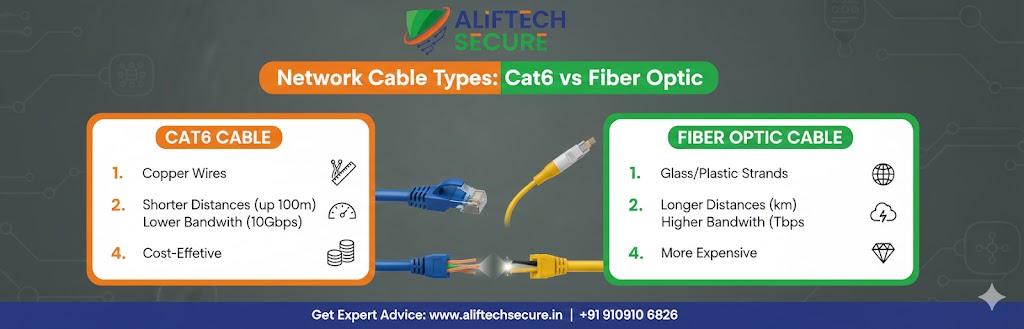
Choosing the right network cable can make or break your internet experience — whether you’re setting up a home office, wiring a new building, or upgrading a business network. The two most popular options today are Cat6 (Category 6) ethernet cable and fiber optic cable. Each has distinct advantages depending on your needs, budget, and environment.
In this guide, we break down everything you need to know: speed, distance, cost, installation, and real-world use cases — so you can make the right call.
What Is Cat6 Cable?
Cat6 (Category 6) is a standardized twisted-pair ethernet cable designed to support Gigabit Ethernet (1 Gbps) at distances up to 100 meters, and 10 Gigabit Ethernet (10 Gbps) at up to 55 meters. It features tighter twists and better insulation than its predecessor, Cat5e, resulting in reduced crosstalk and improved signal quality.
Cat6 cables use the familiar RJ-45 connector, making them compatible with virtually every router, switch, and network card available today. They are widely used in homes, small offices, and enterprise LANs (Local Area Networks). For more on ethernet standards, see the IEEE 802.3 Ethernet Working Group.
- Max speed: 1 Gbps (up to 100m) / 10 Gbps (up to 55m)
- Max bandwidth: 250 MHz
- Connector: RJ-45
- Typical cost: $0.20–$0.50 per foot
There’s also Cat6A (Augmented Category 6), which supports 10 Gbps up to the full 100 meters and offers 500 MHz bandwidth — a solid middle ground before jumping to fiber.
What Is Fiber Optic Cable?
Fiber optic cables transmit data as pulses of light through glass or plastic fibers, rather than electrical signals through copper wire. This fundamental difference is what gives fiber its dramatic performance advantages. There are two main types:
- Single-mode fiber (SMF): Uses a single light path. Supports extremely long distances (up to 80+ km) and high bandwidth. Used by ISPs and large enterprises.
- Multi-mode fiber (MMF): Uses multiple light paths. Shorter range (up to ~2 km) but more affordable. Common in data centers and campus networks.
Fiber optic cables require special connectors (LC, SC, ST) and compatible transceivers or switches, making them more complex to deploy. However, they offer speeds from 1 Gbps all the way up to 400 Gbps and beyond.
Cat6 vs Fiber Optic: Side-by-Side Comparison
| Feature | Cat6 Cable | Fiber Optic Cable |
|---|---|---|
| Max Speed | 1–10 Gbps | Up to 400 Gbps+ |
| Max Distance | 100m (1 Gbps) | Up to 80+ km (SMF) |
| Bandwidth | 250–500 MHz | Virtually unlimited |
| Signal Type | Electrical | Light (photons) |
| Latency | Low | Very low |
| EMI Resistance | Susceptible | Immune |
| Installation Cost | Low | Moderate to High |
| Cable Cost | $0.20–$0.50/ft | $0.50–$3.00/ft |
| Durability | Good | Fragile (glass core) |
| Best For | Home & small office | Enterprise & long-haul |
Speed & Distance: Where Each Wins
For the average home user running 4K streaming, video calls, and gaming, Cat6 delivers more than enough speed. A 1 Gbps connection saturates most residential internet plans, and the 100-meter range covers any typical home or small office floor plan with ease.
Fiber optic truly shines in environments where distance matters. Running cable between buildings on a campus, from a server room to a distant office floor, or across a wide-area network — these are scenarios where Cat6 physically can’t compete. Fiber can carry signals tens of kilometers without signal degradation or repeaters.
Cost: Cat6 Is Cheaper — But Not Always
Cat6 cable is significantly cheaper to purchase and install. The hardware (cable, connectors, patch panels) is inexpensive and widely available, and any electrician can terminate RJ-45 connectors on-site. This makes Cat6 the economical choice for straightforward installations.
Fiber requires specialized tools, trained technicians, and compatible optical switches or media converters. However, as fiber technology matures, prices have dropped substantially. For large-scale deployments where performance justifies the investment, fiber’s total cost of ownership can actually be comparable when you factor in the need to re-run copper cabling as speeds increase.
Interference & Security
One overlooked advantage of fiber is its immunity to electromagnetic interference (EMI). In industrial settings, manufacturing floors, or environments near heavy machinery and power lines, copper cables can pick up electrical noise that degrades signal quality. Fiber is completely unaffected.
Fiber also offers inherent security benefits — it doesn’t emit electromagnetic signals that can be intercepted, making it the preferred choice for secure government, military, and financial networks.
When to Choose Cat6
- Home networking or home office setups
- Small to medium business offices (up to ~100m runs)
- Budget-conscious installations
- Environments where existing RJ-45 equipment is already in use
- Short patch connections between devices in a server rack
When to Choose Fiber Optic
- Runs exceeding 100 meters
- Data centers and high-performance computing environments
- Campus or multi-building networks
- Environments with heavy electrical interference
- Future-proofing infrastructure for 40/100 Gbps and beyond
- ISP backbone and telecommunications infrastructure
Pro Tip: Many modern enterprise networks use a hybrid approach — fiber optic for the backbone and inter-building runs, Cat6 or Cat6A for the “last mile” connection to individual workstations and devices.
The Verdict: Which Should You Use in 2025?
If you’re wiring a home or a single-floor office and speed requirements don’t exceed 10 Gbps over short distances, Cat6 is the smart, cost-effective choice. It’s easy to install, affordable, and supported by every device on the market.
If you need to connect buildings, build a high-speed data center backbone, or future-proof infrastructure for speeds beyond 10 Gbps, fiber optic is the clear winner. The higher upfront cost pays dividends in performance, scalability, and longevity.
For a deeper look at network switches and hardware to pair with your cables, check out resources from Network World or browse our Best Network Switches for 2025 review.
