
Smart Alarm Integration with Mobile Apps: Complete Guide
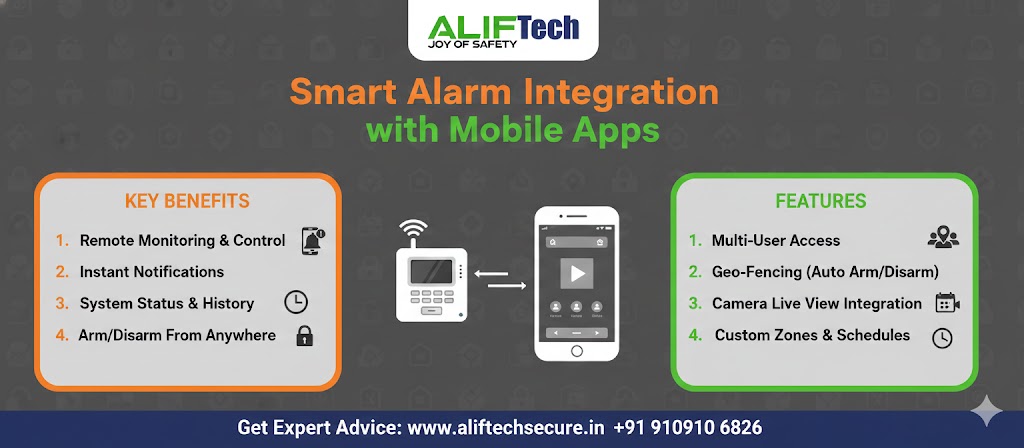
Smart alarm integration with mobile apps has transformed home and business security, enabling remote monitoring and control from anywhere. Modern alarm systems connect seamlessly to smartphones, providing instant alerts, live status updates, and complete system management through intuitive apps. This comprehensive guide covers everything about smart alarm integration with mobile apps.
Understanding mobile connectivity fundamentals is essential before implementing smart alarm systems. First, mobile integration uses WiFi or cellular connections linking alarms to cloud servers. Moreover, dedicated apps on iOS and Android provide real-time access to your security system. Therefore, proper smart alarm integration with mobile apps ensures you stay connected to your property’s security 24/7.
For comprehensive smart security solutions, explore mobile-connected systems. Additionally, review our burglar alarm installation guide for DIY setup instructions.
Understanding Smart Alarm Mobile Integration
How Mobile Integration Works
Smart alarm systems with mobile app connectivity operate through cloud infrastructure. First, your alarm control panel connects to home WiFi or uses built-in cellular. Then, it communicates with manufacturer’s cloud servers. Additionally, your smartphone app connects to these servers retrieving system status and sending commands.
Moreover, this architecture enables remote access from anywhere with internet connection. Furthermore, multiple users can access the system simultaneously through their phones. Finally, cloud servers provide backup for event logs and system configurations.
Benefits of Mobile App Integration
Mobile connectivity transforms traditional alarms in multiple ways:
Remote Monitoring: Check system status from anywhere—home, work, or vacation. Moreover, view real-time sensor states (armed/disarmed, doors open/closed, motion detected).
Instant Alerts: Receive push notifications immediately when alarms trigger, sensors activate, or system issues occur. Additionally, customize which events trigger notifications.
Remote Control: Arm/disarm system remotely, control smart locks, activate cameras, adjust settings. Furthermore, grant temporary access to guests or service workers.
Activity Logs: Review complete history of system events, see who armed/disarmed and when, track access patterns. Moreover, filter logs by date, time, or event type.
Multi-User Management: Add family members with individual access levels, receive alerts when specific users operate system. Additionally, remove access for departing employees instantly.
Learn about smart video doorbell integration for complete entry monitoring.
Essential Mobile App Features
Real-Time System Status
Effective apps provide at-a-glance system overview. First, dashboard shows armed status (Armed Away, Armed Stay, Disarmed). Then, displays all sensor states with color coding. Additionally, battery levels for wireless components appear prominently.
Moreover, live feed from connected cameras (if integrated). Furthermore, environmental sensors (temperature, humidity) display current readings. Finally, quick-arm buttons enable one-tap arming.
Push Notifications and Alerts
Notification customization is crucial for smart alarm mobile integration. First, configure which events trigger alerts: alarm activation, door/window opening, motion detection, low battery warnings, system faults.
Notification Settings:
- Severity levels (critical, warning, information)
- Quiet hours (suppress non-critical alerts)
- Contact method (push, SMS, email, call)
- Multiple recipients (notify family members)
- Custom messages for different zones
Moreover, rich notifications show event details without opening app. Furthermore, actionable notifications allow direct response (call police, disarm system).
Geofencing and Automation
Advanced apps use phone location for intelligent automation. First, auto-arming activates when last person leaves geofence. Then, auto-disarming deactivates when first person arrives. Additionally, reminders trigger if system not armed when leaving.
Moreover, geofencing integrates with smart home devices: lights turn on when approaching home, thermostat adjusts based on occupancy, garage door opens automatically.
Check our smart lock guide for integrated access automation.
Video Integration
Smart alarm integration with mobile apps often includes camera access. First, view live feeds from security cameras. Then, review recorded footage filtered by events. Additionally, download or share video clips.
Moreover, motion-triggered recording starts when alarm activates. Furthermore, two-way audio enables communication through cameras. Finally, AI features detect people, vehicles, or packages.
Remote System Control
Complete control from smartphone is essential. First, arm/disarm system with secure authentication (PIN, biometric). Then, bypass specific sensors temporarily. Additionally, control individual zones independently.
Remote Functions:
- Arm in different modes (Away, Stay, Night)
- Silence alarms remotely
- Unlock doors (with smart lock integration)
- Control lights and thermostats
- Trigger panic alarms
- Test system components
Moreover, emergency features include panic button, medical alert, and fire alarm. Furthermore, one-tap emergency calls to monitoring center.
Reference our network security practices for protecting mobile connections.
Popular Smart Alarm Systems with Apps
Ring Alarm
Amazon’s Ring Alarm offers excellent mobile integration. First, intuitive app with clean interface. Then, seamless integration with Ring cameras and doorbells. Additionally, affordable professional monitoring (₹800/month optional).
Key Features:
- Easy DIY installation
- Cellular backup included
- Alexa voice control
- Works with Ring ecosystem
- Affordable (₹15,000-40,000)
However, requires Ring Protect subscription for video recording. Moreover, limited third-party integration.
SimpliSafe
SimpliSafe provides user-friendly app with robust features. First, no contracts required. Then, excellent sensor variety. Additionally, professional monitoring available.
Key Features:
- Fast alerts (5-second processing)
- Environmental monitoring (smoke, CO, water)
- Smart lock integration
- Good customer support
- Competitive pricing (₹18,000-50,000)
Moreover, works without monitoring subscription. Furthermore, high customer satisfaction ratings.
Ezviz (Hikvision)
Ezviz offers affordable smart alarm with decent app. First, works with Ezviz cameras seamlessly. Then, Alexa and Google Assistant compatible. Additionally, available in India through local dealers.
Key Features:
- Budget-friendly (₹12,000-30,000)
- Local support available
- Camera integration
- No mandatory subscriptions
- Cloud storage optional
However, app interface less polished than competitors. Moreover, limited smart home integrations.
CP Plus Smart Alarm
Indian manufacturer CP Plus provides local support. First, designed for Indian market. Then, affordable with decent features. Additionally, local service centers assist.
Advantages:
- Lower cost (₹8,000-25,000)
- Local warranty and support
- Works with CP Plus cameras
- No region restrictions
- Indian customer service
However, app quality lags international brands. Moreover, fewer advanced features.
Visit smart alarm systems for current options.
Setup and Configuration
Initial System Setup
Setting up smart alarm mobile integration begins with hardware installation. First, install control panel in central, accessible location with strong WiFi signal. Then, mount sensors on doors, windows, and motion detection areas.
Installation Steps:
- Unbox and charge all components
- Download manufacturer app (iOS/Android)
- Create account with email and password
- Mount control panel (near router for WiFi)
- Install sensors following included instructions
- Power on system
Moreover, ensure control panel within WiFi range. Furthermore, test signal strength before finalizing placement.
App Pairing and Connection
Connecting alarm to mobile app is critical for integration. First, ensure phone connected to 2.4 GHz WiFi (many systems don’t support 5 GHz). Then, open app and begin setup wizard.
Pairing Process:
- Open app and tap “Add System”
- Scan QR code on control panel or manual
- Enter WiFi password when prompted
- Wait for connection (typically 1-3 minutes)
- Name your system (e.g., “Home Alarm”)
- Set time zone and location
- Configure notification preferences
- Add sensors to system
Additionally, enable push notifications in phone settings. Moreover, allow location access for geofencing features.
User Management
Adding family members or employees is essential for smart alarm integration. First, navigate to user management in app. Then, send invitation via email or text.
User Setup:
- Tap “Add User” in app
- Enter user email or phone
- Assign permission level (Admin, User, Guest)
- Set access restrictions (specific zones, times)
- User receives invitation
- User creates account and gains access
Moreover, admins can remove users instantly. Furthermore, audit logs show which user performed actions.
Explore access control integration for comprehensive user management.
Advanced Integration Features
IFTTT and Smart Home Automation
IFTTT (If This Then That) extends smart alarm capabilities. First, create applets triggering actions based on alarm events. Then, integrate with hundreds of services and devices.
Example Automations:
- Alarm activates → Turn on all lights
- Door sensor opens → Send email notification
- System disarmed → Adjust thermostat to comfort mode
- Motion detected → Start camera recording
- System armed → Lock all smart locks
Moreover, custom automations match your specific needs. Furthermore, no coding required—simple point-and-click interface.
Voice Assistant Integration
Voice control adds convenience to smart alarm mobile integration. First, Amazon Alexa integration enables voice arming and status checks. Then, Google Assistant provides similar functionality. Additionally, Apple HomeKit (when supported) offers Siri control.
Voice Commands:
- “Alexa, arm my security system”
- “Hey Google, is my alarm armed?”
- “Alexa, lock the front door”
- “Hey Google, show me the front camera”
However, disarming typically requires PIN for security. Moreover, not all systems support all assistants.
Professional Monitoring Integration
Many systems offer optional professional monitoring. First, monitoring center receives alarm signals 24/7. Then, operators verify emergencies and dispatch police/fire. Additionally, cellular backup ensures connectivity during internet outages.
Monitoring Benefits:
- 24/7 professional response
- Faster emergency dispatch
- Insurance discounts (5-20%)
- Cellular backup included
- Peace of mind when traveling
However, monitoring costs ₹500-1,500 monthly. Moreover, contracts may be required (check terms carefully).
Reference our fire alarm systems for life safety integration.
Security and Privacy
Protecting Your Mobile Access
Securing smartphone app access is critical. First, use strong, unique passwords (16+ characters). Then, enable two-factor authentication. Additionally, use biometric login (fingerprint/face) for convenience with security.
Security Best Practices:
- Strong password with 2FA enabled
- Keep app updated to latest version
- Don’t share login credentials
- Review authorized devices regularly
- Logout from unused devices
- Set auto-lock on phone
Moreover, avoid public WiFi when controlling alarm. Furthermore, use VPN if accessing remotely on unsecured networks.
Data Privacy Considerations
Smart alarm mobile integration involves data collection. First, manufacturers collect system events and usage patterns. Then, some sell anonymized data to third parties. Additionally, cloud storage of video raises privacy concerns.
Privacy Protection:
- Review manufacturer privacy policy
- Understand what data is collected
- Disable unnecessary data sharing
- Use local storage when possible
- Regularly delete old footage
- Comply with local privacy laws
Moreover, some systems offer end-to-end encryption. Furthermore, local processing options reduce cloud dependence.
Check data protection guidelines for compliance.
Troubleshooting Common Issues
Connection Problems
WiFi connectivity issues are most common in smart alarm integration. First, verify alarm panel within router range. Then, confirm 2.4 GHz network enabled. Additionally, check password entered correctly.
Solutions:
- Move router closer or add WiFi extender
- Restart router and alarm panel
- Verify no firewall blocking connection
- Update router firmware
- Check bandwidth isn’t maxed out
Moreover, cellular backup activates if WiFi fails. Furthermore, some systems support Ethernet connection.
App Not Receiving Notifications
Missing alerts defeat the purpose of mobile integration. First, verify app notifications enabled in phone settings. Then, check notification preferences in alarm app. Additionally, ensure phone not in Do Not Disturb mode.
Notification Fixes:
- Enable notifications in phone settings
- Allow background app refresh
- Check notification priority level
- Verify battery optimization not limiting app
- Update app to latest version
Moreover, test notifications using app’s test feature. Furthermore, restart phone if problems persist.
System Shows Offline
“Offline” status prevents remote access. First, check alarm panel power connected. Then, verify WiFi network operational. Additionally, test internet connection.
Offline Troubleshooting:
- Verify panel powered on (LEDs lit)
- Check WiFi network working (other devices connected)
- Restart alarm panel
- Verify router online and functioning
- Check cellular backup status (if equipped)
Moreover, power outages cause temporary offline status. Furthermore, local control panel typically still functions.
Slow App Response
Laggy apps frustrate users. First, check internet speed (minimum 2 Mbps upload). Then, verify cloud server status (manufacturer website). Additionally, clear app cache.
Performance Improvements:
- Improve internet speed
- Close unnecessary apps
- Clear app cache/data
- Update app version
- Reinstall app if needed
Moreover, cellular data connection may be slower than WiFi. Furthermore, server issues occasionally cause delays.
Cost Analysis
Hardware Costs
Basic Systems (5-10 sensors):
- Control panel: ₹5,000-12,000
- Door/window sensors: ₹3,000-8,000
- Motion detectors: ₹2,000-6,000
- Keypad: ₹1,500-3,000
- Siren: ₹1,500-3,000
- Total: ₹13,000-32,000
Comprehensive Systems (15-20 sensors):
- Advanced control panel: ₹10,000-25,000
- Multiple sensors: ₹8,000-20,000
- Environmental sensors: ₹4,000-10,000
- Cameras (optional): ₹10,000-40,000
- Smart locks (optional): ₹8,000-25,000
- Total: ₹40,000-₹1,20,000
Ongoing Subscription Costs
App Access: Usually free (included with hardware)
Cloud Storage (if needed): ₹200-800/month for video
Professional Monitoring: ₹500-1,500/month (optional)
Total Annual Cost (with monitoring and cloud):
- Monthly: ₹700-2,300
- Annual: ₹8,400-27,600
Therefore, factor subscriptions into budget. Moreover, self-monitoring eliminates monthly fees.
Visit smart alarm pricing for current costs.
Best Practices
Optimizing Battery Life
Wireless sensors require periodic battery replacement. First, use quality alkaline batteries. Then, adjust sensor sensitivity (reduce false triggers). Additionally, improve WiFi signal (reduces power consumption).
Battery Optimization:
- Quality batteries last 1-3 years
- Test sensors monthly
- Replace low batteries promptly
- Keep spare batteries on hand
- Note battery replacement dates
Moreover, some systems alert when batteries low. Furthermore, hardwired sensors eliminate battery concerns.
Regular System Testing
Monthly testing ensures reliability. First, test each sensor individually. Then, verify app receives alerts. Additionally, check camera feeds and recordings.
Testing Schedule:
- Weekly: Check app connectivity
- Monthly: Test all sensors and alarms
- Quarterly: Verify backup battery/cellular
- Annually: Professional inspection (if available)
Moreover, document test results. Furthermore, address issues immediately.
Keeping Software Updated
Firmware and app updates improve security and features. First, enable automatic updates where possible. Then, check manually monthly. Additionally, read update notes understanding changes.
Moreover, updates patch security vulnerabilities. Furthermore, new features often added free.
Conclusion: Enhanced Security Through Connectivity
Smart alarm integration with mobile apps revolutionizes home and business security by providing unprecedented control and awareness. First, instant alerts ensure you’re informed immediately of any security events. Moreover, remote access enables monitoring from anywhere in the world. Additionally, automation features adapt security to your lifestyle.
Therefore, selecting systems with robust mobile apps is crucial for modern security needs. Whether choosing DIY solutions or professional installations, ensure strong app functionality, reliable notifications, and comprehensive features. Furthermore, balance cost with desired features—basic systems provide excellent security while advanced options add convenience.
Ultimately, smart alarm mobile integration provides peace of mind knowing your property stays protected and connected whether you’re home or away. The convenience of managing security from your smartphone makes these systems invaluable for today’s connected lifestyles.
For complete smart home security, explore our CCTV installation guide and smart doorbell options for comprehensive protection.
Frequently Asked Questions: Smart Alarm Mobile Integration
Q: Do smart alarms work without internet?
A: Basic functions (sensors, sirens) work without internet, but mobile app access requires connectivity. Moreover, cellular backup maintains monitoring during internet outages. Therefore, local system operation continues independently.
Q: Can multiple people use the alarm app?
A: Yes, most systems support multiple users. Simply invite family members through app. Additionally, assign different permission levels. Moreover, receive notifications when specific users arm/disarm system.
Q: Are smart alarm apps secure from hackers?
A: Reputable brands use encryption and security protocols. However, use strong passwords and enable two-factor authentication. Moreover, keep apps and firmware updated. Therefore, follow security best practices protecting access.
Q: Do I need professional monitoring with mobile apps?
A: No, self-monitoring through apps is free alternative. However, professional monitoring ensures 24/7 response. Additionally, monitored systems get faster emergency dispatch. Therefore, evaluate your needs and budget.
Q: What happens if my phone dies or is lost?
A: Access alarm through any device with app installed. Additionally, keypads provide local arming/disarming. Moreover, family members with app access can control system. Therefore, phone issues don’t compromise security.
Q: Will smart alarms drain my phone battery?
A: Minimal battery impact from modern apps. However, constant location tracking (geofencing) uses more power. Moreover, reduce notification frequency if concerned. Therefore, battery drain is negligible for most users.
Q: Can I integrate different brands (alarm, cameras, locks)?
A: Some systems support third-party integration through IFTTT or smart home platforms. However, same-brand ecosystems offer best integration. Moreover, verify compatibility before purchasing. Therefore, research integration capabilities carefully.
Q: Do smart alarms work during power outages?
A: Yes, backup batteries maintain operation (typically 24 hours). Additionally, cellular backup communicates if WiFi down. Moreover, battery status appears in app. Therefore, power outages don’t compromise security.
