
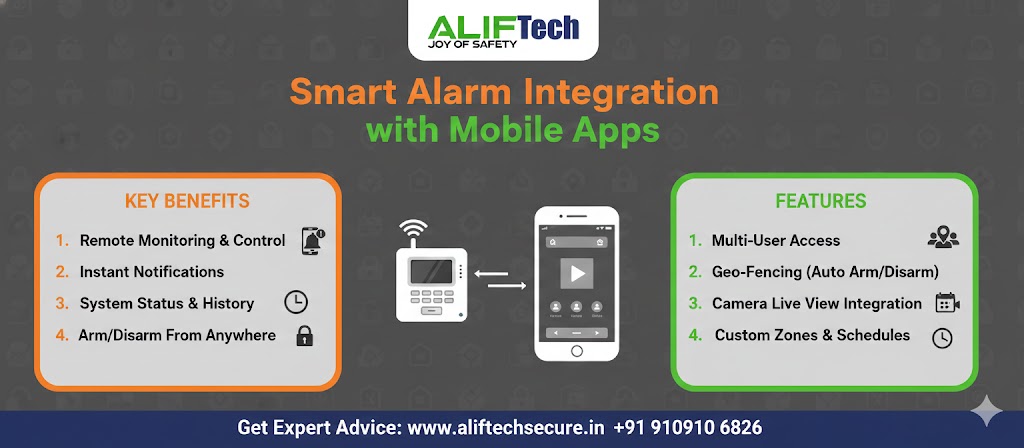
Most people buy an alarm for the siren. What they end up using every day is the phone.
Knowing the house is armed while you are three hours away. Seeing that the shop shutter opened at 6:40 AM, which is when it should have. Getting a notification the moment a door opens at 2 AM, rather than finding out in the morning.
That is what the app layer adds, and it is worth understanding what it can and cannot do before you buy a system built around it.
Quick Answer
- The app is the daily value. The siren is the deterrent.
- Local siren and sensors work without internet. App access does not.
- Check the panel supports 2.4 GHz WiFi, since many do not work on 5 GHz.
- Cellular backup matters here, because a cut line or an outage takes the app offline.
- You are a Data Fiduciary if you run this for a business and it records people.
What the App Actually Gives You
Four things, and they are not equally useful.
Instant alerts. A push notification the moment a sensor triggers, rather than discovering it later. This is the feature people actually value, and it is worth configuring properly rather than accepting the defaults.
Remote arming and disarming. Realising at the office that nobody armed the shop, and fixing it from there. Or letting a service technician in without driving over.
Status at a glance. Armed or disarmed, which doors are open, which sensor batteries are low. Most useful last thing at night and first thing on leaving.
Event history. Who armed the system and when, which sensor triggered, how long a door stayed open. For a business with staff, this is often the part that settles arguments.
Our burglar alarm range covers systems with app support.
How It Works, and Where It Fails
The panel connects to your WiFi or uses a built-in cellular module, and talks to the manufacturer’s servers. Your phone talks to the same servers.
So the app depends on three things staying up: your internet, your power, and the manufacturer’s cloud.
The local system does not. Sensors trigger, the siren sounds, and the keypad still arms and disarms, regardless of whether the internet is working.
That distinction matters more here than in most markets, because both power cuts and connection drops are routine.
Two things to specify because of it:
Cellular backup. If the broadband fails, or somebody cuts the line, a cellular path keeps alerts flowing. Without it, an intruder who cuts your connection has also cut your notifications.
Battery backup on the panel. Enough to hold through a typical outage, and it should report the power failure rather than going quiet.
Setting It Up Properly
Before you start
Check the WiFi band. Many alarm panels support only 2.4 GHz. If your router runs a combined 2.4 and 5 GHz network under one name, the panel may fail to connect. Splitting the networks or temporarily disabling 5 GHz during setup usually solves it.
Place the panel where the signal is strong. Central, accessible, and within reliable range of the router. Test the signal at that spot before mounting anything.
Pairing
Download the manufacturer’s app, create an account, then add the system by scanning the QR code on the panel or entering the ID manually. Enter the WiFi password when prompted and wait a minute or two.
Then name the system, set the time zone, and configure notifications before adding sensors.
Enable push notifications in your phone settings as well as in the app. This is the single most common reason people report “the app never alerts me.” The app permission and the phone permission are separate.
Configuring alerts so people actually read them
An app that alerts on everything gets muted within a fortnight, and a muted app is worse than no app because you believe you are covered.
Set critical alerts for alarm activation, entry while armed, and panic button. Set informational alerts for arming, disarming and low batteries. Then turn off everything else until you find you want it.
Use quiet hours for non-critical alerts. Nobody needs a low-battery notification at 3 AM.
Adding users
Add family members or staff through the app, each with their own login and permission level. Admins can remove access instantly, which matters when an employee leaves.
The event log then shows who did what, which is far more useful than a shared PIN that four people know.
Geofencing, and Why It Sometimes Annoys People
Geofencing uses your phone’s location to arm the system when the last person leaves and disarm when the first person arrives.
It works well in some households and irritates others. Phone location can be imprecise, so the system may disarm when you drive past on the way somewhere else, or fail to arm because a phone lost GPS in a basement car park.
A gentler version works better for most people: a reminder notification if the system is not armed when you leave, rather than automatic arming. You keep the convenience and lose the surprises.
What to Buy in India
Be careful here, because most international guides on this topic recommend products you cannot readily get.
Ring and SimpliSafe dominate American coverage of smart alarms. Neither has proper Indian distribution, warranty support or local service. A system with no local service channel is a system nobody can fix when it fails in year two.
Look instead for:
- A panel with cellular backup, not WiFi only
- Local warranty and service you can actually reach
- 2.4 GHz support confirmed
- App availability on both Android and iOS, in current versions
- No mandatory subscription for basic app access
CP Plus has Indian manufacturing, local service centres and app-connected alarm products, which makes it the sensible default for most households and small businesses here. Our wireless and wired ranges cover the options.
On certification. If your system includes cameras, those cameras must meet MeitY’s Essential Requirements since 1 April 2026. Ask for the BIS registration number for the exact model. Our guide to the 2026 CCTV rules covers what changed, and it is worth checking which consumer brands actually hold current certification before buying an app-connected camera.
The Data Question
Rarely covered, and it matters if you run this for a business.
A cloud-connected alarm sends event data, and often video, to the manufacturer’s servers. If that system records identifiable people, and you are a business rather than a household, you are a Data Fiduciary under the Digital Personal Data Protection Act.
For a home, the Act exempts processing for purely personal or domestic purposes. Your own house, your own family, no obligation.
For a shop, office or factory, it does not. You are recording customers and staff, which means a notice at the entrance, a documented retention period, and deletion on schedule.
Three questions to ask any vendor before choosing a cloud-connected system for a business:
- Where are the servers, and is the data held in India?
- How long is footage and event data retained, and can I change that?
- Who at the manufacturer can access it?
Our guide on CCTV footage retention covers the retention side properly.
Securing the App Itself
An alarm you can disarm from a phone is an alarm someone else can disarm from a phone if they get your login.
Use a long, unique password. Not the one you use elsewhere.
Turn on two-factor authentication if the app supports it. Biometric login on the phone then keeps it convenient.
Review authorised devices occasionally and remove any you no longer use.
Keep the app and the panel firmware updated, since these patches close real vulnerabilities rather than just adding features.
Avoid disarming over public WiFi. Use mobile data instead, which is both faster and safer.
When Things Go Wrong
No notifications arriving. Check phone settings first, then app settings. Confirm background refresh is allowed and that battery optimisation is not suspending the app. Most systems have a test notification function, so use it rather than waiting for a real event.
System shows offline. Confirm the panel has power and its LEDs are lit. Check the WiFi is working for other devices. Restart the panel, then the router. If cellular backup is fitted, verify it took over.
Cannot connect during setup. Almost always the 2.4 GHz issue. Check the panel is not being offered a 5 GHz-only network, and confirm the password is correct.
Sluggish app. Check upload speed at the premises, since most connections here are asymmetric and the upload is what carries the data. Clearing the app cache also helps.
What It Costs
| Component | Cost |
|---|---|
| Control panel | ₹5,000 to ₹12,000 |
| Door and window contacts, each | ₹500 to ₹1,500 |
| Motion detector, each | ₹1,500 to ₹3,000 |
| Keypad | ₹1,500 to ₹3,000 |
| Siren, internal and external | ₹1,500 to ₹3,000 |
| Basic system, 5 to 10 sensors | ₹13,000 to ₹32,000 |
| Comprehensive, 15 to 20 sensors plus cameras | ₹40,000 to ₹1.2 lakh |
| Cloud video storage, if used | ₹200 to ₹800 per month |
| Professional monitoring, if used | ₹500 to ₹1,500 per month |
App access is usually free and included with the hardware, which is worth confirming before buying since a few systems charge for it.
Self-monitoring costs nothing ongoing. You get the alerts and decide what to do. Professional monitoring adds a response pathway and a monthly fee, and it makes sense for premises holding real value overnight rather than for an ordinary home.
Our commercial alarm guide covers monitoring in more detail.
Keeping It Working
Monthly: trigger one sensor and confirm the alert arrives on every phone that should get it.
Quarterly: check battery levels in the app, replace anything low, and verify the siren still sounds.
Twice a year: test the cellular backup by disconnecting the broadband briefly, and check for firmware updates.
Wireless sensor batteries last one to three years. The app should warn you, but the warning only helps if somebody reads it, which is why the monthly check matters.
Frequently Asked Questions
Does a smart alarm work without internet?
The local system does. Sensors trigger, the siren sounds, and the keypad still arms and disarms. What stops is app access and remote alerts. Cellular backup keeps notifications flowing when the broadband fails, which is why it is worth specifying rather than treating as optional.
Can several people use the app for one system?
Yes. Most systems support multiple users, each with their own login and permission level. The event log then records who armed or disarmed and when. For a business this is considerably better than a shared PIN, because access can be removed for one person without changing it for everyone.
Are alarm apps safe from being hacked?
Reasonably, with a strong unique password and two-factor authentication enabled. The realistic risk is not a sophisticated attack but a reused password appearing in a breach elsewhere. Keep the app and panel firmware updated, and review authorised devices occasionally.
Do I need professional monitoring if I have the app?
Not necessarily. Self-monitoring through the app costs nothing ongoing and works well for homes and small businesses. Monitoring adds verification and a response pathway when you cannot get there yourself, which matters more for premises holding valuable stock overnight.
What if my phone is lost or the battery dies?
The keypad still works locally, and anyone else with the app can control the system. Install the app on a second phone in the household, and keep the keypad PIN known to whoever needs it. Phone problems should never leave you locked out of your own alarm.
Will the app drain my phone battery?
Barely, in normal use. Continuous location tracking for geofencing uses noticeably more, which is one reason to prefer a reminder notification over automatic arming. Turning geofencing off removes the drain entirely.
The Short Version
Specify cellular backup and battery backup, because those decide whether the app works when it matters.
Configure alerts so people read them rather than mute them. Add users individually rather than sharing a PIN. And if it is a business, sort out the data notice and retention before the system goes live.
The app is the part you will use daily. Everything else is what protects you on the night something happens.
Book a free alarm site survey in Indore. We walk the premises, mark every opening that needs a sensor, and set up the app properly on every phone that needs it before we leave.
We supply and install wired, wireless and hybrid systems with cellular backup, and configure alerts so they are useful rather than constant. For businesses, we cover the notice and retention side as part of the handover.
See our burglar alarm installation service, our alarm repair and service, or get in touch.
Call or WhatsApp +91 91091 06826.

